Wie du dich von Play-E‑Mails abmeldest
Kurze Schritt-für-Schritt-Anleitung (mit Screenshots) und die einfachste Methode, dich mit Leave Me Alone abzumelden.

Wie du dich von Play-E‑Mails abmeldest
Eine Schritt-für-Schritt-Anleitung
Es gibt verschiedene Wege, sich von Play-Marketing‑E‑Mails abzumelden

 Über Play
Schritt-für-Schritt-Anleitung: Abmeldung von Play
Befolge diese Schritte, um dich manuell von Play-E‑Mails abzumelden
- 1
- Suche zuerst in deinem Postfach nach einer E‑Mail von Play.
- Suche nach createwithplay.co.
from:createwithplay.co
- 2Gehe ans Ende der E‑Mail, klicke auf Abmelden. Die Seite, die sich öffnet, sieht so aus.

- 3Klicken Sie auf die blaue Schaltfläche 'Opt Out of All Emails', um alle E-Mails abzubestellen.

- 4Du bist jetzt von Play-E‑Mails abgemeldet!

Entrümple dein gesamtes Postfach von Newslettern mit Leave Me Alone
Die meisten Methoden, sich von unerwünschten E‑Mails abzumelden, erfordern viel Handarbeit und garantieren nicht, dass die Nachrichten aufhören. Leave Me Alone bietet einen einfachen und effektiven Weg, dein Postfach aufzuräumen!
Der Vorteil von Leave Me Alone: Du musst nicht manuell abarbeiten. Wir zeigen dir alle Newsletter und Marketing‑E‑Mails aus deinem Postfach, und du wählst schnell aus, von welchen du dich abmelden willst.
Wir übernehmen die mühselige Abmeldung für dich
So stoppst du den Empfang von Play-E‑Mails mit Leave Me Alone:
- 1. Melde dich bei Leave Me Alone an.
- 2. Verbinde dein E‑Mail‑Konto (du kannst mehrere Adressen verknüpfen).
- 3. Schau dir die Abo‑Liste an, um zu sehen, welche Absender dein Postfach verstopfen.
- 4. Klicke beim jeweiligen Eintrag auf den Abmelden‑Button, um die E‑Mails zu entfernen.
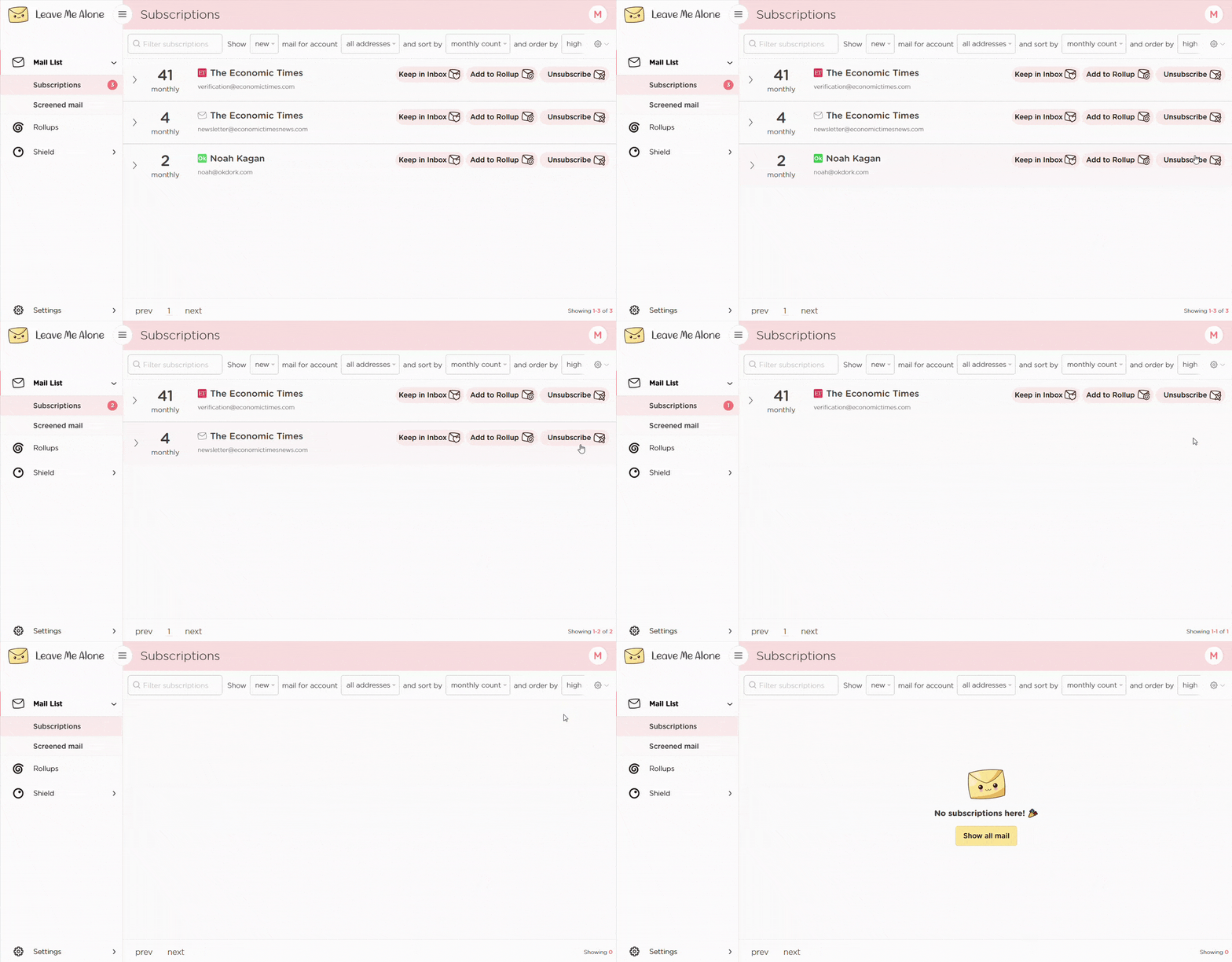
Das ist der einfachste Weg, sich von Play abzumelden! Leave Me Alone übernimmt die Abmeldung automatisch und selbst wenn du unseren Dienst nicht mehr nutzt, sind diese E‑Mails dauerhaft entfernt.
Leave Me Alone works with a variety of email providers, including Gmail, Outlook and Hotmail, Yahoo, Zoho Mail, and others. It will also help you unsubscribe from emails from other platforms such as EventConnect, Constella, Better Homeowners (InTouch Systems), 410Labs, / Paddle
Erfahre mehr zum Abmelden mit Leave Me Alone
Or...
Jetzt abmeldenAußerdem hat Leave Me Alone viele weitere Funktionen, die dein Postfach sauber halten
Nachdem du unerwünschte E‑Mails massenhaft abgemeldet hast, helfen dir unsere Rollups‑, Screener‑ und Spam‑Blocker‑Funktionen, dein Postfach mit minimalem Aufwand sauber zu halten!
Echtes Abbestellen

Wir folgen Abmeldelinks und melden dich wirklich ab von den E-Mails. Du erhältst sie nie wieder, auch wenn du unseren Dienst nicht mehr nutzt.
Mehrere Konten
Du kannst mehrere E‑Mail-Konten verbinden und alle Abo‑E-Mails an einem Ort sehen. Kein Wechseln zwischen Registerkarten mehr!
Mehrere Rollups

Du kannst deine E-Mails in bis zu 10 Rollups kategorisieren. Diese Zusammenfassungen können täglich oder wöchentlich nach deinem Zeitplan verschickt werden.
Kaltmails blockieren

Genervt von angeblich persönlichen Mails, die dir etwas verkaufen wollen? Wir blockieren Kaltmails aus Massenversand, damit sie nicht in deinem Posteingang landen.
Wichtige Absender

Du möchtest einige wichtige E-Mails sofort erhalten. Markiere Absender als prioritär, dann landen ihre Nachrichten immer direkt in deinem Posteingang.
Nicht‑stören‑Modus

Brauchst du Zeit, um dich zu konzentrieren?
Unser Nicht‑stören‑Modus hält deine E-Mails zurück und liefert sie, wenn deine Fokuszeit vorbei ist.
Funktioniert mit jedem E‑Mail‑Anbieter
Egal welchen E‑Mail‑Anbieter du nutzt, Leave Me Alone funktioniert damit.
Leave Me Alone funktioniert mit Gmail, Outlook, Yahoo, AOL, Fastmail, iCloud und vielen mehr!







Häufige Fragen zum Abmelden von Play
Von welcher Adresse werden Play-E‑Mails gesendet?
Die meisten Newsletter werden von harcourt@createwithplay.co versendet
Warum bekomme ich nach dem Abmelden noch E‑Mails?
Manche Absender brauchen bis zu 72 Stunden, um Löschungen zu verarbeiten. Du kannst weiterhin transaktionale E‑Mails erhalten, z. B. Belege oder Konto‑Benachrichtigungen.
Ist diese Anleitung mit Play verbunden?
Nein. Diese unabhängige Anleitung stammt von Leave Me Alone und hilft dir, unerwünschte E‑Mails zu verwalten.
Überzeuge dich selbst: Das sagen unsere Kunden
 4.5 Sterne aus 2,000+ positiven Kundenbewertungen
 4.7 von 5 bei 120 Bewertungen
 4.8 von 5 bei 77 Bewertungen
 Halte dein Postfach sauber und sag den Abonnements
dass sie dich in Ruhe lassen sollen!
Melde dich kostenlos von 10 E-Mails ab - keine Kreditkarte erforderlich.
14 Tage Geld-zurück-Garantie
Diese Anleitung dient nur zu Informationszwecken und steht in keiner Verbindung zu Play.


