

Does your typical workday start with reading emails and end with many unread emails?
Email overload is one of the biggest problems that reduces employee productivity. With all the internal discussions, newsletters, notifications, and follow-ups, you can easily get lost in a sea of emails and never get any real work done.
But fortunately, with the advent of AI technology, this is no longer the case.
In this article, you’ll find out how AI is reducing email overload, what matters, and how to make the most of this technology without losing control of your inbox.
What’s new
AI is now built into everyday email workflows
AI features come integrated into email platforms. They are not plug-ins anymore. Instead of depending only on manual rules and folders, you can now:
- Automatically prioritize important messages
- Summarize long email threads
- Generate quick replies
- Categorize incoming emails in real time
The change is significant because the process of managing emails is transforming from a manual process to AI-based decision-making.
Key takeaways
- AI helps in managing email overload by prioritizing, summarizing, and automating emails
- The maximum productivity benefit is through filtering and summarization, not automation
- AI works best when combined with simple rules and unsubscribe habits
- Heavy dependence on AI can lead to missed context. Therefore, reviewing the emails still matters
- Consider privacy and accuracy before enabling AI features
What is email overload?
Email overload is a situation where you are receiving more emails than you can handle effectively.
It is not that you are receiving too many emails, just that many emails are not relevant or important.
Email overload in one line:
Email overload = high volume + low relevance + constant interruptions
The result is predictable:
- Important emails get buried
- Decisions get delayed
- Your attention is constantly fragmented
Why it matters
Email overload is inconvenient and it directly affects how work gets done.
When your inbox becomes your default workspace:
- You spend more time reacting than thinking
- Context switching increases mental fatigue
- Small tasks expand to fill entire work sessions
In remote and hybrid teams, email is crucial for communication. Therefore, managing the emails efficiently is a necessity.
Though AI cannot completely solve this problem, it can help reduce the workload involved in staying on top of your email.
How AI helps (step by step)
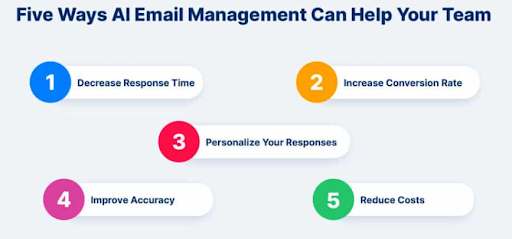
Consider the AI email tools as a system that works in layers. Each layer removes a specific type of problem from your inbox.
1. Filtering and prioritization
AI identifies which emails are likely important based on:
- Sender behavior
- Past interactions
- Content signals
Instead of scanning everything manually, you start with a shorter and more relevant list.
2. Summarization
With AI, you can reduce long threads to a few key points:
- Main decision
- Key updates
- Action items
This is especially useful in team discussions where context builds across multiple replies.
3. Smart replies and drafting
AI suggests short responses based on the email content. This doesn’t replace writing, but it reduces the effort for routine replies like:
- Confirmations
- Acknowledgments
- Simple updates
4. Categorization
AI automatically groups emails into categories like:
- Primary
- Updates
- Promotions
This filters out the relevant information from the background noise.
5. Automation
Some of the actions that AI can trigger include:
- Archiving less important emails
- Assigning tags to incoming emails
- Directing emails to particular folders
This reduces inbox maintenance over time.
Types of AI email features
Here’s how the main AI features compare in practice:
| Feature | What it does | Benefit | Limitation |
|---|---|---|---|
| Smart filtering | Prioritizes emails | Reduces noise | May misclassify messages |
| Summarization | Shortens threads | Saves time | Can miss nuances |
| Auto replies | Suggests responses | Speeds up replies | Can feel generic |
| Categorization | Sorts inbox | Improves organization | Needs occasional tuning |
| AI assistants | Manage inbox | Injects higher efficiency | Raises privacy concerns |
Examples
Example 1 (simple): priority inbox
Your inbox automatically surfaces:
- Messages from your team
- Emails you’ve interacted with before
Newsletters and automated notifications are pushed down, so you don’t have to sift through them first.
Example 2 (realistic): thread summarization
You open a long email thread with multiple replies.
Instead of reading everything, you see a summary:
- Decision: launch delayed by one week
- Action: update timeline
- Owner: product team
You still have access to the full thread, but you don’t need to read it line by line.
Example 3 (workflow): AI + rules combination
AI flags important emails at the top of your inbox. At the same time:
- Rules archive promotional emails
- Notifications skip the inbox entirely
Your inbox becomes a focused list of emails that require attention.
Example 4 (edge case): over-automation risk
An AI system deprioritizes an email that turns out to be important. This highlights a key limitation: AI reduces workload, but it doesn’t fully replace judgment.
Advanced AI voice features like voice-to-text drafting and spoken email summaries make email management faster and more natural. You can respond to or find any emails without typing or reading everything manually. However, these features still rely on interpreting context, which means you should review the outputs before acting on them. Modern voice AI is now fast, scalable, and multilingual. This makes it easier to integrate into everyday workflows.
Common misconceptions (and quick clarifications)
1. Misconception: AI can take care of everything in your inbox.
Clarification: AI can help you save time, but it is up to humans to make sure everything is proper and accurate.
2. Misconception: If we automate everything, it will increase productivity.
Clarification: That is not true. Too much automation can decrease productivity.
3. Misconception: AI summaries are accurate, and we don’t need to read emails.
Clarification: Summaries are useful as a preview. We cannot bypass the need for reading emails in depth.
4. Misconception: AI tools understand everything completely.
Clarification: They work best with patterns.
When to use it & when not to
Use AI when…
- You receive a high volume of repetitive emails
- You spend significant time sorting or scanning messages
- You want faster triage and prioritization
Skip it (or limit it) when…
- Emails contain sensitive or confidential information
- Accuracy is critical (legal, financial, or compliance-related messages)
- Your inbox volume is already manageable
Boundaries you shouldn’t cross (privacy + accuracy)
AI email tools rely on analyzing your messages to function effectively.
That makes a few things important:
- Be cautious with sensitive company data
- Review the data policies of any AI tool you use
- Avoid blindly trusting generated summaries or replies
Step-by-step: How to use AI to reduce email overload
Start simple. You don’t need a fully automated system to see results.
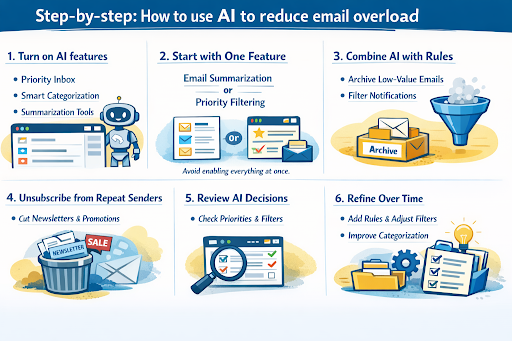
1. Turn on AI features in your email client
Look for:
- Priority inbox
- Smart categorization
- Summarization tools
2. Start with one feature
Choose either email summarization or priority filtering. Avoid enabling everything at once.
3. Combine AI with simple rules
Set up basic rules to:
- Archive low-value emails
- Filter notifications
AI works best when paired with structured inputs.
4. Unsubscribe from repeat senders
AI helps manage emails, but reducing incoming volume is still the biggest win.
Make sure you remove:
- Newsletters you don’t read
- Promotions you ignore
5. Review AI decisions regularly
Check:
- What gets prioritized
- What gets filtered out
Adjust settings based on what you notice.
6. Refine over time
As patterns become clearer:
- Add rules
- Adjust filters
- Improve categorization
What to check: Open your inbox and quickly identify what needs attention without scanning everything.
Troubleshooting
Problem: Important emails are missing
- Likely cause: Filtering is too aggressive
- Fix: Mark key senders as important or adjust priority settings
Problem: Summaries feel incomplete
- Likely cause: Complex or unclear threads
- Fix: Use summaries as guides, not replacements
Problem: Inbox still feels overwhelming
- Likely cause: Too many incoming emails
- Fix: Combine AI with unsubscribing and rules
Problem: AI suggestions feel generic
- Likely cause: Lack of context or personalization
- Fix: Edit responses before sending
Variations
Different setups work for different workflows:
AI-first workflow
- AI handles prioritization and summarization
- Minimal manual sorting
Minimal AI workflow
- Use only filtering and categorization
- Rely on manual review
Hybrid workflow (recommended)
- AI for prioritization and summaries
- Rules for structure
- Unsubscribing for long-term reduction
Why this works
Reducing email overload goes beyond eliminating unwanted emails; it’s about separating signal from noise.
AI helps by:
- Highlighting what matters
- Compressing what doesn’t
- Removing repetitive tasks
This lowers cognitive load and lets you focus on decisions instead of sorting.
Frequently Asked Questions
Can AI completely remove the email overload?
No. It reduces effort, but managing incoming volume is still necessary.
Is AI email safe to use at work?
It depends on the tool. Always review privacy policies and follow company guidelines to ensure maximum security.
What’s the fastest AI feature to start with?
Priority inbox or email summarization.
Does AI improve productivity immediately?
Usually, but only when combined with good inbox habits.
Should I still unsubscribe from emails?
Yes. Tools like Leave Me Alone can help you quickly unsubscribe from recurring senders and clean up inbox clutter before layering in automation. Your inbox may feel overwhelming, but that doesn’t mean you should automate everything at once. Start by removing noise, automate one process, and then gradually build from there.
